Good search dog training depends on repetition, comparison and clear debriefing. Notes, chat history and individual GPS files are easy to lose. RescueDogs keeps map recordings, dog profiles, search data, ratings and training goals in one workflow.
Why training records matter
It is rarely enough to know that a session happened. Teams need to know what was trained, under which conditions and how dog and handler worked together.
- Route, weather, wind, terrain and search area stay traceable.
- Persons, markers and special points remain attached to the map.
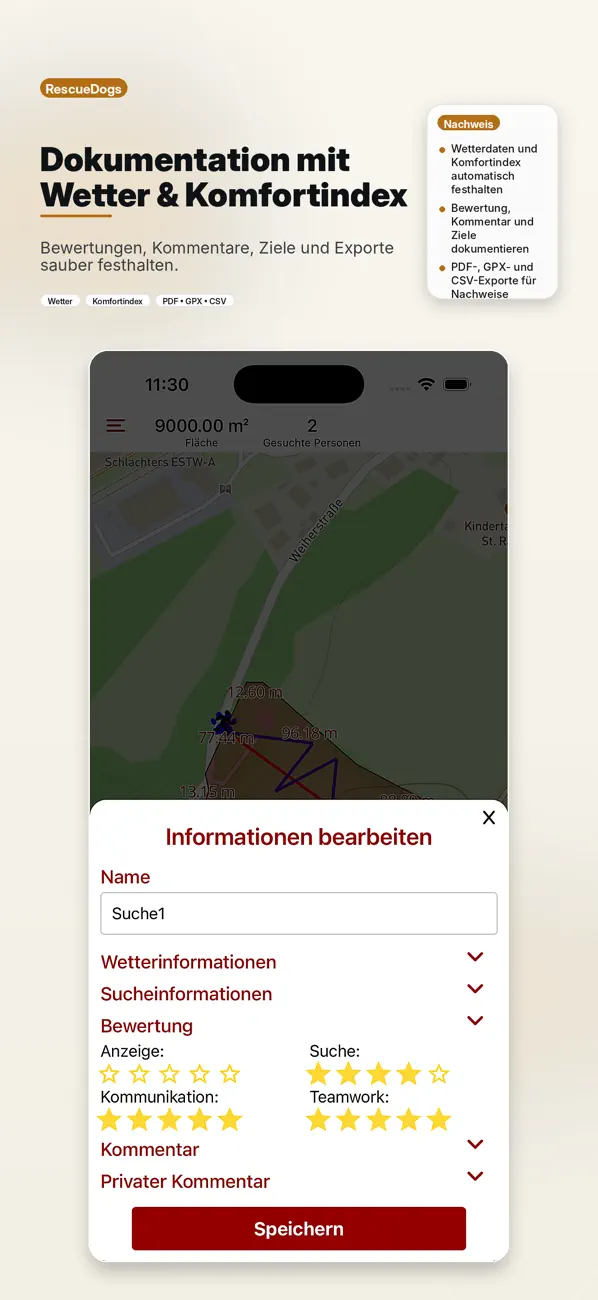
- Ratings and comments make progress easier to discuss.
Training and exercise tools
Recording
Record dog and handler routes and connect them with search data.
Search areas
Draw, import, copy, export and assign areas to dogs or sessions.
Goals
Track ratings, comments, open topics and next training targets.
Exports
Use GPX, PDF and CSV for proof, analysis and exchange.
Review instead of memory
After training, records can be opened, rated and commented. Multiple searches can be shown together to compare development, area coverage or search behavior.
Understand results by conditions
With Premium, review documented results in the app, on the web and in your training report for each dog, component and discipline, grouped by environment and knowledge of the search route. Assistance and false alerts show their average and the number of documented observations. You can see how much was recorded: missing values stay unknown, and an entered 0 counts. The analysis describes observations; it does not rank teams or explain causes.
From a milestone to the next exercise
Link a training component to your milestone, then choose “Document exercise”. Use “Repeat exercise” to start the next session for the same dog and exercise. Record fresh results and observations and choose your next training focus. You decide when to complete the milestone.
With Premium, turn a training programme into milestones and reuse it for another dog you own, even without a unit. Organization admins and trainers with Premium can manage shared programmes and link milestones to existing training components.
Admins and trainers can review documented components. Revision history keeps earlier versions, and an edited record can receive a fresh review. Existing goals and records remain readable and exportable when Premium ends; authorized users can still archive programmes.
Personal training components, with or without GPS
Choose “Personal” in the training area, including when you belong to an organization. Create your own components and results for exercises such as obedience, dexterity or search tasks. A dog and one of your saved recordings are optional. Revision history, photos or PDFs as evidence, and PDF or CSV outputs stay in the existing training area. A missing observation stays unknown; an entered 0 stays 0.
Dog profiles, exams and care
Manage several dogs with search types, profile information and training goals. Add your own sport trial records directly to a dog you own, with the result, date, judge and optional scores or evidence. Personal sport records stay separate from organization entries and do not automatically authorize deployment. Premium users can also keep private care reminders such as vaccinations, tick treatment and deworming for their own dogs.
On the web: from a session to a training record
Plan individual events or a training series with limited places and a waiting list. When a place becomes available, the next person moves up. Changes apply to the selected event. Admins and trainers can invite teams from other units to a specific exercise, with access that expires or can be revoked. When closing the event, see which confirmed participants still have no linked component documentation; registration does not confirm attendance.
Use shared exercise plans for group training. Add a component, discipline and planned conditions when useful. Choose “Use plan” to start your own exercise record and document the actual results and observations.
Plan the journey too: add a map point to the meeting place in the training form. Participants can open Google Maps from that point while keeping the written directions. An existing text-only meeting place can be searched directly in Google Maps.
Open a saved search and carry its dog, recording and existing observations into component documentation. Link a unit training event when useful, record the next training focus and add a photo or PDF as evidence. You choose how much to document.
Filter by dog, handler, search type, component and date range. PDF and CSV export the loaded selection. For a complete date-range CSV export, component documentation loads every matching entry with a progress indicator and an option to cancel. Up to 10,000 entries are supported; choose a shorter range for larger histories.
With Premium, review your own recordings and personal training components by date range, even without an organization. GPS recordings and component entries have separate counts and documented days; several components from one exercise do not become extra GPS training sessions. Results, exercise details and reports support your review. Authorized organization analysis also includes trainer feedback. Frequency alone is not a performance rating.
Component analysis shows recorded search targets, finds, false alerts and assistance by discipline, plus trail age for mantrailing. Each value includes the number of records containing that detail. Missing information does not count as zero. Search also finds the next training focus and the linked event.
Switch your training programmes to the due-date view to find the next open milestones. Overdue steps are easy to spot, and you can return to the original programme overview at any time.
Name areas in the search-area planner and on search maps. GPX exports retain these names, making the same areas easier to find at the next session.
Personal recording remains available without joining a unit. Shared records follow your organization’s roles and permissions.
Offline in the training area
Offline maps and cached recordings help when reception is weak. Login, organization data, live tracking and synchronization still need an internet connection.
Enough detail for your next session
Optional exercise details cover the supported search and training disciplines. Record planned and found targets, false alerts and assistance for area-based exercises; record trail age, false alerts and assistance for mantrailing. An empty field stays unknown; 0 is a recorded result. Practice and operation records stay separate. Rating summaries show how many ratings actually exist.
Every session should give something back.
RescueDogs makes training easier to plan, easier to understand and easier to improve.
Practical guide · 16 October 2026 · Lukas Bruderhofer / IT-Bruderhofer
A unit training session from goal to debrief
Example data: dog “Demo”, goal “calm indication”. Agree the goal and search type before starting; select the relevant date when working within a unit training event. After recording, add observations and an optional rating for the dog.
- Prepare the exercise and required map before leaving.
- Check the chosen location source and dog, then record.
- Review the route and observations together; for mantrailing, select the matching runner reference.
- Record one specific next exercise. Do not treat a missing rating as poor performance.
Documentation supports trainer decisions; it does not certify operational fitness.